
Journey Map for Field Research
CONTEXT
CoStar provides hundreds of data points about commercial properties, including images. In addition, they provide marketing services for sellers that want to advertise a property on LoopNet, complete with professional quality media assets.
To do this, they have 2 enormous departments of field researchers and architectural photographers spread throughout the country (and abroad). Their jobs are to drive around their locale, collecting and confirming data points, and/or setting up appointments for professional photo shoots. It’s a somewhat physical job that requires a lot of juggling of equipment.
PROJECT
Role: Sole UX Designer
Deliverables: User Journey Map
CHALLENGE
Unfortunately, the tools field researchers and photographers have to complete their tasks are incomplete themselves and are scattered across multiple applications; some applications only work on one device type. So they might be able to access something on their phone while they’re walking around, but another tool or data point is only available on their laptop in the car. As a result, the researchers are constantly juggling devices and antiquated applications, often while driving or trying to manage camera equipment.
The business wanted to integrate all applications into a single source of truth that would work on all devices for the field. However, because the researchers had such a complex workflow, even communicating the tasks and processes of the field researcher became a challenge without an overview and a shared understanding of what they’re actually doing out in the field.
ACTION
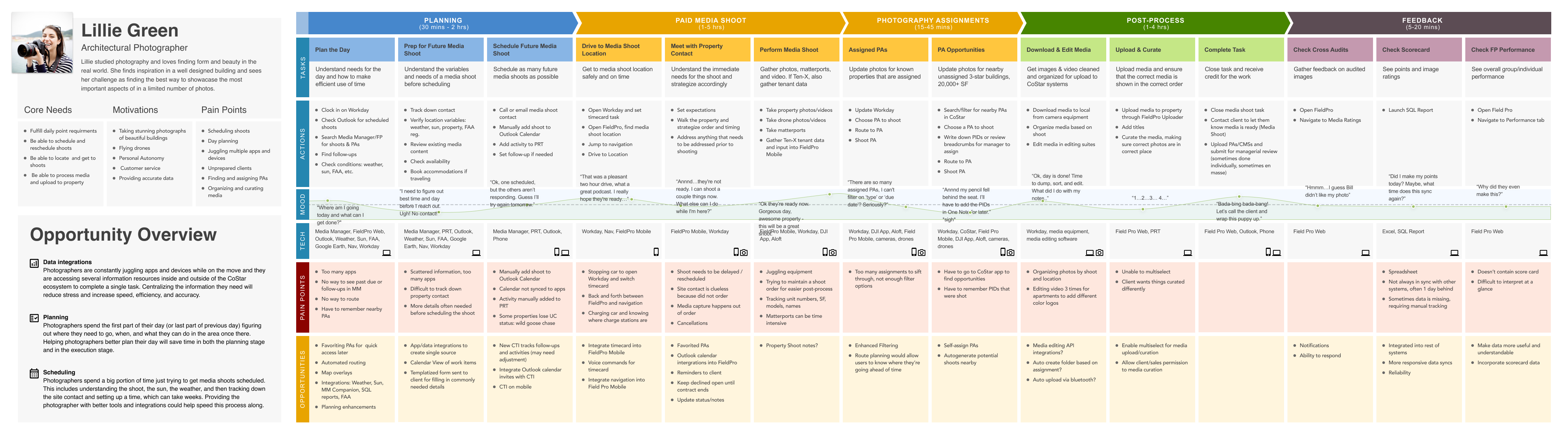
I realized we needed a picture (that we could all agree on) of what the job actually looked like from the contributor’s perspective. This document would serve several purposes:
1.) provide a shared understanding of the job
2) highlight pain points and opportunities
3) give product and design a way to sell feature ideas to stakeholders
4) provide quick context for new people on the project, as well as any work that takes place in the future
I teamed up with the product manager in charge of field research applications, who also happens to be an SME for one of the the user groups, Architectural Photographers.
I set up a shared excel doc for us to start roughing in the general experience. The architectural photographers (APs) were juggling lots of different equipment and applications between office, car, and field, so I knew we would need to map devices and applications along the X-axis (“tech”), as well as pain points/opportunities and, of course, some description of what they were doing.
The “mood” dimension was added to create a bit of storytelling and provide a quick reference of where the experience was lacking.
The PM and I went about filling in the excel doc, based on her experience in the position. We then set up regular meetings with some APs working in the field to review, get their input, and check our direction and refine.
After I had taken our excel work and converted it into a presentable journey document, I added in the left panel persona and the TL;DR section.
RESULT
The document received positive reactions from stakeholders and executives. However, given the chaotic business environment of internal applications, this project ended up being deprioritized in favor of more pressing integrations and needs (see Workflow MVP).
Despite being tabled, this document still did two important things:
1.) It set an example of thinking through experiences, rather than just reacting and shooting from the hip; something that was all too common in the business environment we worked in.
Designers wanted to do this sort of work, but did not feel empowered by the business to pursue it. The business seemed to be either unaware of the value of strategy work or didn’t understand it.
By circulating this document to designers and business stakeholders we set a precedent and planted a seed for what’s possible and what tools and approaches could be used in the future.
2.) It provided a design template for designers to pick up and quickly start building out their own user journeys. I had already done the hard work of design and layout, and tried to build the file as modularly as possible for other designers to use.
——-
Eventually, when the project reanimates, business and design will have a reference document to work from; a shared conceptualization of the job and a set of feature improvements to explore.
Yes, the document is information dense and requires some study. Feel free to take a closer look.